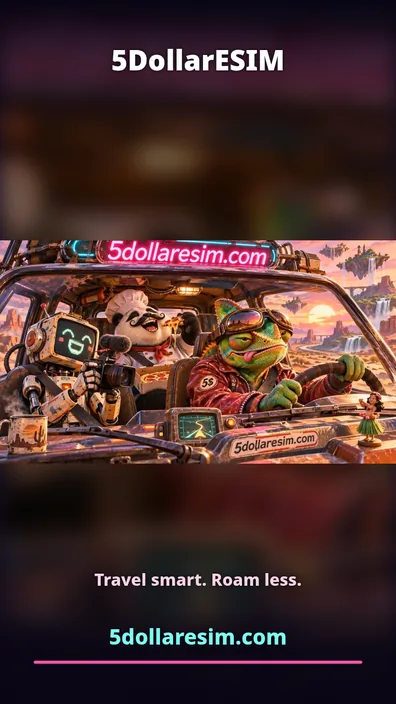
01. Cinematic Fit
Preserves the whole wide shot. Best when more than one subject matters, or when the product sits near the edge. Uses a blurred, darkened fill behind the original frame rather than empty black bars.
Turning a landscape image-to-video result into a vertical Reel is not as simple as changing the dimensions. A careless crop can remove a product, cut off a face or bury the call to action.
Each example is derived from the same internal 5DollarESIM AI video clip. The underlying footage stays unchanged; only the presentation and visible field of view are different.
Preserves the whole wide shot. Best when more than one subject matters, or when the product sits near the edge. Uses a blurred, darkened fill behind the original frame rather than empty black bars.

Fills the entire phone screen, but discards part of the original image. You must check whether hands, product labels and secondary characters remain visible. A horizontal focus control makes this trade-off explicit.
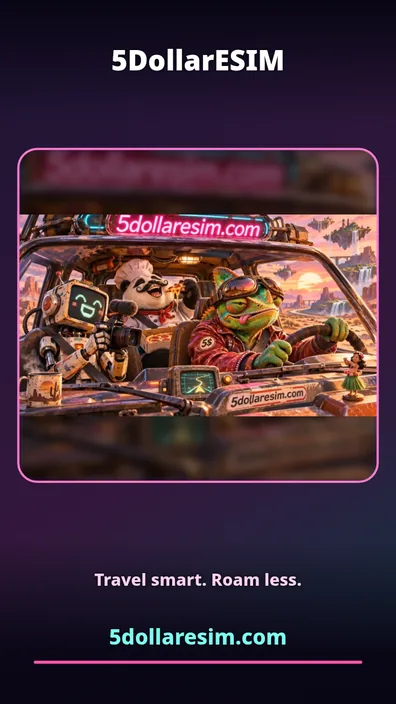
Frames the footage inside a designed canvas. Best for offers where a strong brand or tagline deserves space. It is a creative choice, not a way to recover missing video details.
The three pictured layouts are demonstrations from our private owner testing tool, not publicly purchasable exports.
AI image-to-video tools may distort or crop text that was printed in the source image. For critical brand copy, render a separate overlay after AI generation. Check spelling of the domain, offer, legal disclaimers and next-step instructions before exporting.
A good finishing system should never silently replace, truncate or misspell your headline. If it does not fit, the editor should say so and let you shorten it.
Reels and short-video apps place interface controls over the video. Those overlays can change by platform and device. Keep key copy away from edges and preview a guide rather than relying on a single universal pixel value.
Exporting a 768p AI source on a 1080×1920 canvas can improve the sharpness of added logos and text, but cannot invent missing source-video detail. The same applies to bitrate: very high encoding quality preserves what exists; it cannot fix blurry generated footage.
Sound matters to ad storytelling, but only use music, effects or voice recordings with appropriate commercial rights. Adding audio inside the browser is possible using local Web Audio mixing, although container and codec support varies by browser.
Some browsers can export silent H.264 MP4 but produce WebM when audio is included. For reliable, platform-ready MP4 with AAC audio across all customers, a server or dedicated rendering worker is the right production approach.
When the footage is acceptable, changing a headline, URL or logo usually should not trigger another costly AI generation. This is central to our planned low-risk workflow. A genuinely different motion or scene can require another paid generation attempt.
The Smart Export Studio is being tested privately by the site owner. Public AI generation, automatic paid delivery and the proposed $5 / $1.50 pricing are not live at this time.